
Networking
Using FTP Via XeXmenu
Using FTP Via XeXmenu
Downloading The Required Apps
- Setup XeXmenu
- Connect to network via one of these methods connecting to internet with live block on or connecting to xbox live with a stealth server
- Once XeXmenu is setup, open the app on your console
- Press RB until XeXmenu shows your console info including your loacl ip which should look like 192.168.x.x
- Take note of this ip and move to your computer
Installing FileZilla
- We are going to move to a computer now
In order to use FTP, the console must be on and XeXmenu must be open.
- Download a ftp client, i use filezilla
- Open filezilla
- At the top goto Edit then settings
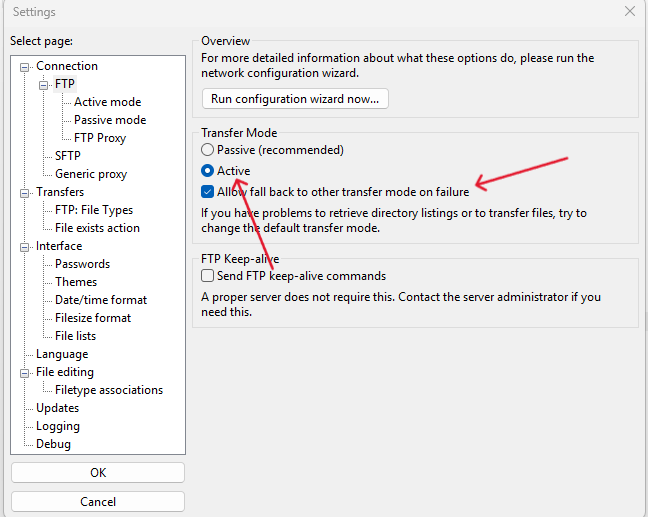
- Click FTP under select page, and enable active and allow fallback to other transfer mdoe on failure
- Close the settings menu
- At the top you should see "host, username, password, port" in host put your consoles ip, username xbox, password xbox, port 21
- Press Quick Connect. It should pull up your console's hard drive contents. FTP is now set up.