Games and DLC
Installing Multi-Disc Games with Multiple Play Discs
Installing Multi-Disc Games with Multiple Play Discs
Installing ISO2GOD
- Download ISO2GOD
Converting Your Games
- If the disc are in a zip extract them so you have the iso
- open up ISO2GOD
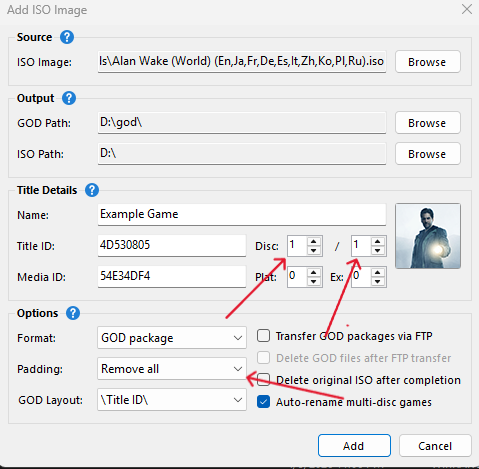
- drag the first iso into ISO2GOD
- under title details change disc 1 / 1 to 1 / how ever many discs you have, if the game has 3 play disc make it 1 / 3
- under option select padding and select it to remove all
- check mark Auto-rename multi-disc games
- repeat for the other discs you have, make sure to change the disc number to the correct disc number
- once all disc are added press convert
- ISO2GOD will convert the games into a GOD formatted game
Transfering Your Games
- go to where ISO2GOD converted your games and locate the title id for the game
- If you store your files on your internal hard drive connect to FTP.
- Or if you store your files on a flash drive plug in your flash drive to your computer
Enabling Auto Swap For BadAvatar
- For BadAvatar users open up your launch.ini find the autoswap setting and enable to true save config and boot the exploit
Before exploiting make sure you are not connecting to the internet at all, no ethernet or wifi connected/enabled if using BadAvatar
- Boot BadAvatar
Enabling Auto Swap For RGH
This is for RGH users only
- open Dashlaunch on your console
- goto behavior
- and enable autos swap
- Press RB and X on HDD to save your config if you store your files on your internal hard drive or click X on USB if you store files on your flash drive